# Computer Geeks Please Assemble Part 2
**URL:** https://forums.speedlife.net/t/computer-geeks-please-assemble-part-2/262287
**Category:** Shift518 Off Topic
**Created:** [January 13, 2012, 2:54pm UTC](https://forums.speedlife.net/t/computer-geeks-please-assemble-part-2/262287 "2012-01-13T14:54:19Z")
**Posts on this page:** 20
**Page:** 1
### Author:  [@JClark](https://forums.speedlife.net/u/JClark)
#### Post date: [January 13, 2012, 2:54pm UTC](https://forums.speedlife.net/t/computer-geeks-please-assemble-part-2/262287/1 "2012-01-13T14:54:19Z")
Dear Shift 24hr Tech Support,
VICTORY!!!
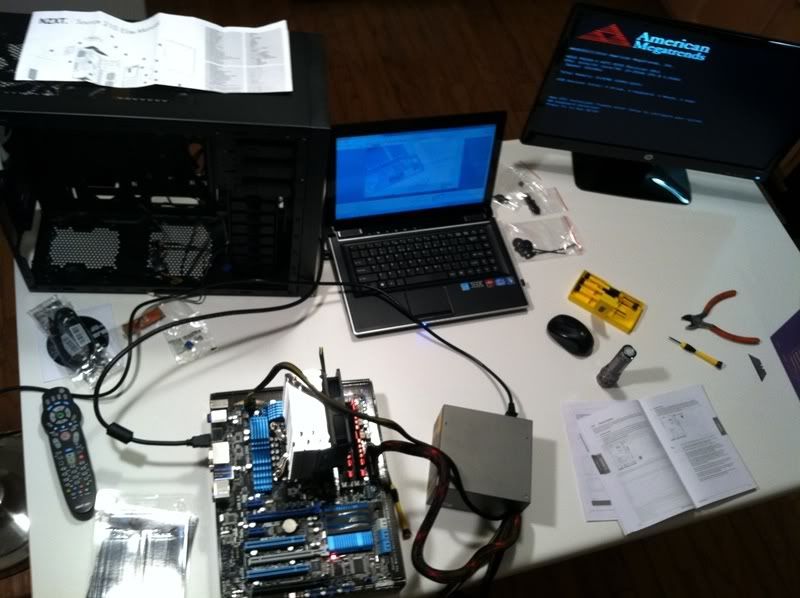
#senseofaccomplishment
New office comp build. Aiming for 4.5ghz. I will be posting annoying newb first timer questions here. Thanks in advance.
---
### Author:  [@Mike3](https://forums.speedlife.net/u/Mike3)
#### Post date: [January 13, 2012, 3:23pm UTC](https://forums.speedlife.net/t/computer-geeks-please-assemble-part-2/262287/2 "2012-01-13T15:23:38Z")
Nice! That’s a hyper 212+ right? Should be good for about 4.5 ghz.
---
### Author:  [@JClark](https://forums.speedlife.net/u/JClark)
#### Post date: [January 13, 2012, 3:28pm UTC](https://forums.speedlife.net/t/computer-geeks-please-assemble-part-2/262287/3 "2012-01-13T15:28:03Z")
Yessir 212+. Appears 4.5 is towards the upper end of its capacity so I’ll keep an eye on it to start.
Used IC Diamond thermal paste - crazy thick. Anyone used it before?
---
### Author:  [@HudsonFalcon](https://forums.speedlife.net/u/HudsonFalcon)
#### Post date: [January 13, 2012, 5:41pm UTC](https://forums.speedlife.net/t/computer-geeks-please-assemble-part-2/262287/4 "2012-01-13T17:41:05Z")
Awesome pick-up Mr. Clark and funny enough I just received my Cooler Master Hyper 212 Evo in the mail today!
---
### Author:  [@JClark](https://forums.speedlife.net/u/JClark)
#### Post date: [January 13, 2012, 6:17pm UTC](https://forums.speedlife.net/t/computer-geeks-please-assemble-part-2/262287/5 "2012-01-13T18:17:18Z")
Proof that it lives. Since it’s probably illegible, it says 4.326ghz on the “medium” overclock setting. Going for extreme badass mode in a few and I’ll see what I get. 😃
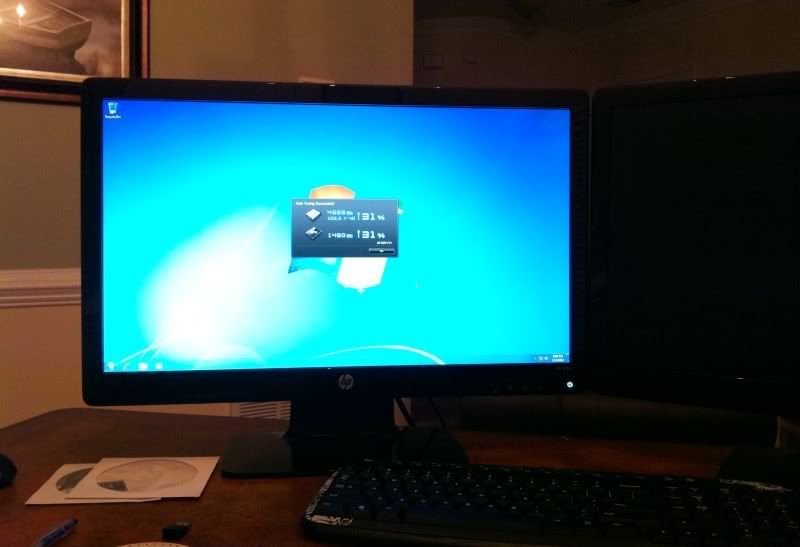
First question: It takes the mobo awhile to post and get on with it. It also has an additional screen before Windows loads that says “Press enter to boot from cd/dvd etc etc.” Any way to streamline that?
---
### Author:  [@HudsonFalcon](https://forums.speedlife.net/u/HudsonFalcon)
#### Post date: [January 13, 2012, 6:32pm UTC](https://forums.speedlife.net/t/computer-geeks-please-assemble-part-2/262287/6 "2012-01-13T18:32:29Z")
> [@WTH: Someone to mow my lawn](https://forums.speedlife.net/t/wth-someone-to-mow-my-lawn/47878/6):
>
> Proof that it lives. Since it’s probably illegible, it says 4.326ghz on the “medium” overclock setting. Going for extreme badass mode in a few and I’ll see what I get. 😃
>
> 
>
> First question: It takes the mobo awhile to post and get on with it. It also has an additional screen before Windows loads that says “Press enter to boot from cd/dvd etc etc.” Any way to streamline that?
Go into the BIOS and set your HDD as your primary boot device.
---
### Author:  [@JClark](https://forums.speedlife.net/u/JClark)
#### Post date: [January 13, 2012, 6:38pm UTC](https://forums.speedlife.net/t/computer-geeks-please-assemble-part-2/262287/7 "2012-01-13T18:38:56Z")
Doh. Thanks.
---
### Author:  [@HudsonFalcon](https://forums.speedlife.net/u/HudsonFalcon)
#### Post date: [January 13, 2012, 6:45pm UTC](https://forums.speedlife.net/t/computer-geeks-please-assemble-part-2/262287/8 "2012-01-13T18:45:21Z")
NP. What are your temps during idle and under load with the 212?
---
### Author:  [@JClark](https://forums.speedlife.net/u/JClark)
#### Post date: [January 13, 2012, 6:55pm UTC](https://forums.speedlife.net/t/computer-geeks-please-assemble-part-2/262287/9 "2012-01-13T18:55:01Z")
15_C idle CPU, 19_C mobo idle. Haven’t really loaded it up yet. During a quick scan the CPU went into the 20s.
Is there a standard test or action you can do you load up the CPU? I dont have any vid files to transcode or anything at the moment.
Edit: CPU temp peak at 27\*C so far.
---
### Author:  [@Mike3](https://forums.speedlife.net/u/Mike3)
#### Post date: [January 13, 2012, 10:55pm UTC](https://forums.speedlife.net/t/computer-geeks-please-assemble-part-2/262287/10 "2012-01-13T22:55:21Z")
I always use prime95, seems to load the CPU up real goooood.
27C is NOTHING.
I don’t like to see mine go over 60\*C, but they say you can go to 75ish np.
I use Real temp GT to monitor.
---
### Author:  [@HudsonFalcon](https://forums.speedlife.net/u/HudsonFalcon)
#### Post date: [January 14, 2012, 3:24am UTC](https://forums.speedlife.net/t/computer-geeks-please-assemble-part-2/262287/11 "2012-01-14T03:24:58Z")
> [@who rides a motorcycle without a license](https://forums.speedlife.net/t/who-rides-a-motorcycle-without-a-license/47876/25):
>
> I always use prime95, seems to load the CPU up real goooood.
>
> 27C is NOTHING.
>
> I don’t like to see mine go over 60\*C, but they say you can go to 75ish np.
>
> I use Real temp GT to monitor.
+1. Prime95 gives the processor a very robust workout. It basically gives the processor and endless amount of tasks to run which stresses it.
Your temps are great and there is an endless amount of temp programs you can use to monitor your hardware. Just remember that with a multi-core GPU the temp of each core is more important, and will give you a more accurate assessment of load, than just the overall processor temp.
---
### Author:  [@ninety1two40](https://forums.speedlife.net/u/ninety1two40)
#### Post date: [January 14, 2012, 5:12am UTC](https://forums.speedlife.net/t/computer-geeks-please-assemble-part-2/262287/12 "2012-01-14T05:12:52Z")
+1 on Prime95
---
### Author:  [@JClark](https://forums.speedlife.net/u/JClark)
#### Post date: [January 14, 2012, 7:10am UTC](https://forums.speedlife.net/t/computer-geeks-please-assemble-part-2/262287/13 "2012-01-14T07:10:11Z")
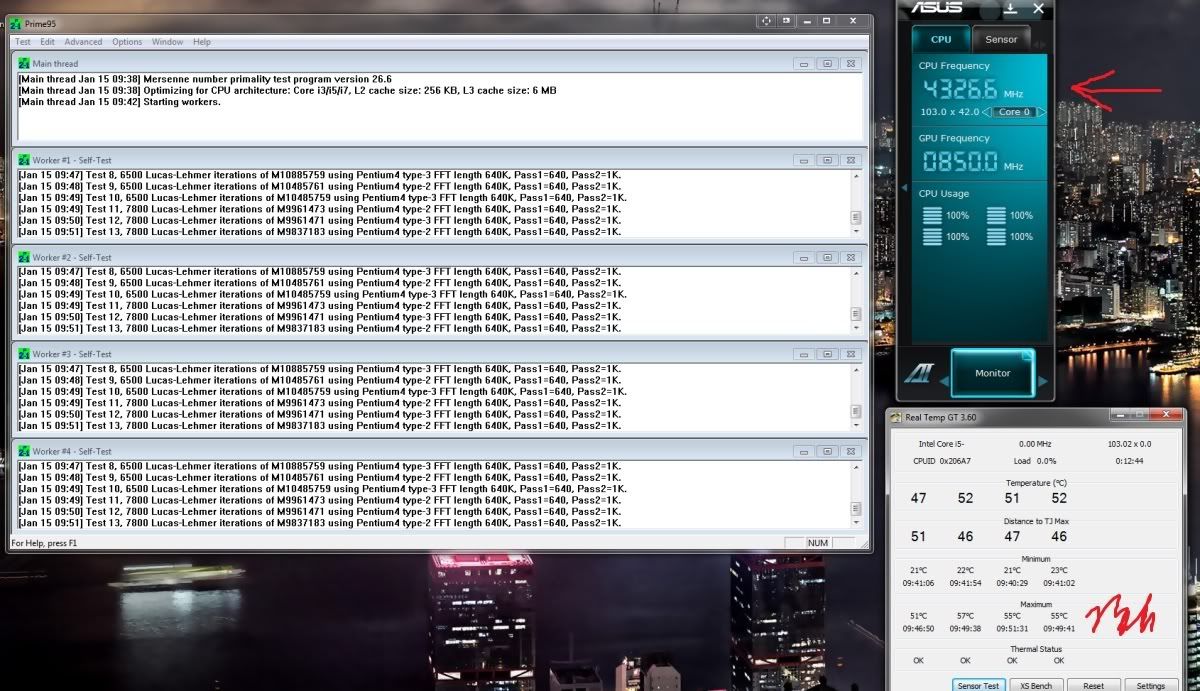
I reached 4.786ghz last night but it crashed twice so I backed it back down to 4.3xxghz. There’s an intermediate step at 4.5xxghz too that runs fine. This is all just using Asus’s UEFI BIOS auto tune settings, no further tweaking.
Downloaded Prime95 and Real Temp. Peaks highlighted below. Is the spread between the cores normal?
New WEI. Graphics are the integrated Intel HD 3000, no discrete. This isnt used for gaming.
Specs:
i52500k @ 4.327ghz
CM 212+ cooler
G.Skill 8gb (2x4GB) 1600mhz
OCZ Vertex3 90GB SSD SATA3
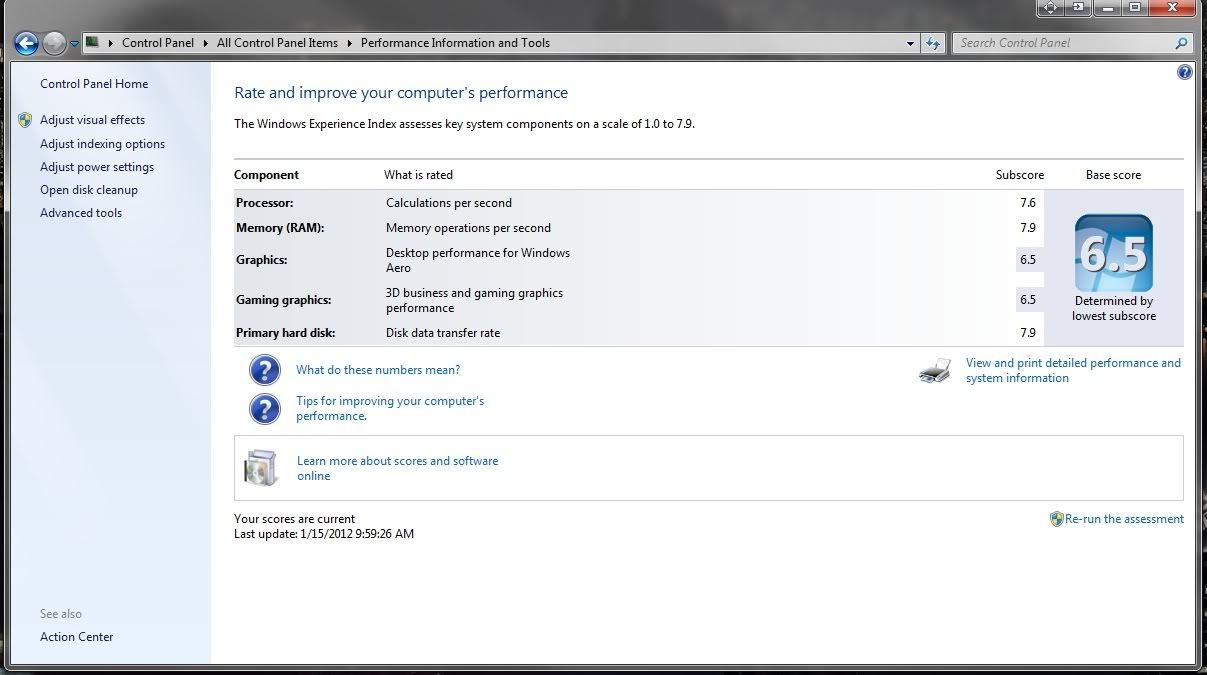
WEI of the **old** one. Was a good soldier for a long time but it was time to upgrade.
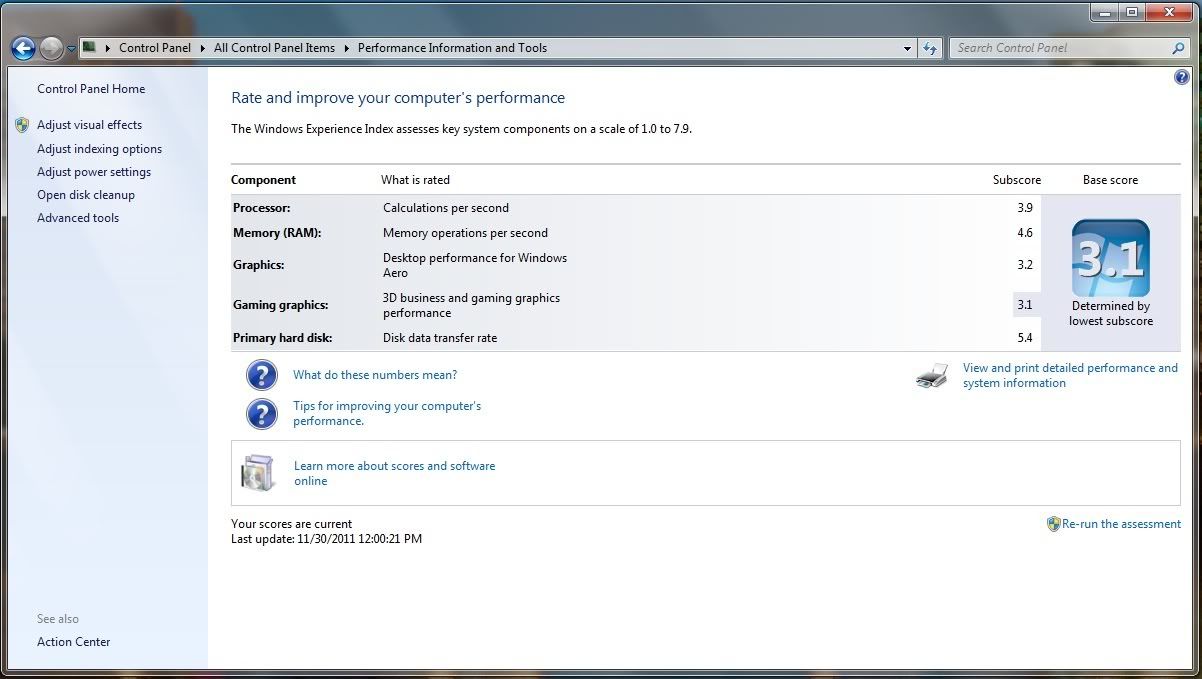
So holy crap this is fast and easy to use. We dont do tons of heavy processor stuff, but enough of it for a weak processor to slow you down. AutoCad and other engineering software, huge spreadsheets and financial analysis software, etc. I also sift through thousands of PDFs using the Windows Explorer preview (alt+p) which the SSD has sped up considerably. I’m regularly showing partners, investors, whoever things on this PC and now there wont be that awkward pause while we wait for it to load something. Sweeeeeet.
Comments welcome. Tweaks, etc. I optimized Windows 7 for the SSD and leaned out the 7 install a little bit. Doesnt start as fast as my laptop but pretty quick.
---
### Author:  [@RocketPunch](https://forums.speedlife.net/u/RocketPunch)
#### Post date: [January 14, 2012, 7:33am UTC](https://forums.speedlife.net/t/computer-geeks-please-assemble-part-2/262287/14 "2012-01-14T07:33:42Z")
Lets see some benchmark man!
---
### Author:  [@JClark](https://forums.speedlife.net/u/JClark)
#### Post date: [January 14, 2012, 7:44am UTC](https://forums.speedlife.net/t/computer-geeks-please-assemble-part-2/262287/15 "2012-01-14T07:44:03Z")
Name the free program or torrent and I will make it so.
---
### Author:  [@HudsonFalcon](https://forums.speedlife.net/u/HudsonFalcon)
#### Post date: [January 14, 2012, 7:44am UTC](https://forums.speedlife.net/t/computer-geeks-please-assemble-part-2/262287/16 "2012-01-14T07:44:57Z")
The spread between the cores is normal, my 8 core has the same type of spread. Keep an eye out for any BIOS updates for your board as it will help with the threading between cores. From what I’ve read Windows 8 is really supposed to address the threading between cores and how they communicate with one another.
---
### Author:  [@HudsonFalcon](https://forums.speedlife.net/u/HudsonFalcon)
#### Post date: [January 14, 2012, 7:45am UTC](https://forums.speedlife.net/t/computer-geeks-please-assemble-part-2/262287/17 "2012-01-14T07:45:27Z")
> [@Took some pics today....](https://forums.speedlife.net/t/took-some-pics-today/47902/6):
>
> Name the free program or torrent and I will make it so.
3D Mark is a free benchmarking program.
---
### Author:  [@JClark](https://forums.speedlife.net/u/JClark)
#### Post date: [January 14, 2012, 7:56am UTC](https://forums.speedlife.net/t/computer-geeks-please-assemble-part-2/262287/18 "2012-01-14T07:56:17Z")
3D Mark doesnt want to run. Says I need DirectX 11 hardware. No love for integrated GPU up in here.
---
### Author:  [@HudsonFalcon](https://forums.speedlife.net/u/HudsonFalcon)
#### Post date: [January 14, 2012, 8:00am UTC](https://forums.speedlife.net/t/computer-geeks-please-assemble-part-2/262287/19 "2012-01-14T08:00:56Z")
> [@IM CALLING YOU OUT FIREHAWK853!!!](https://forums.speedlife.net/t/im-calling-you-out-firehawk853/42858/439):
>
> 3D Mark doesnt want to run. Says I need DirectX 11 hardware. No love for integrated GPU up in here.
Are you planning on upgrading your GPU or are you using the integrated?
---
### Author:  [@JClark](https://forums.speedlife.net/u/JClark)
#### Post date: [January 14, 2012, 8:01am UTC](https://forums.speedlife.net/t/computer-geeks-please-assemble-part-2/262287/20 "2012-01-14T08:01:56Z")
No plans to add a discrete vid card any time soon.
[Next page](https://forums.speedlife.net/t/computer-geeks-please-assemble-part-2/262287.md?page=2)