# Fit-PC
**URL:** https://forums.speedlife.net/t/fit-pc/254880
**Category:** Shift518 Off Topic
**Created:** [October 4, 2010, 3:07pm UTC](https://forums.speedlife.net/t/fit-pc/254880 "2010-10-04T15:07:29Z")
**Posts on this page:** 19
**Page:** 1
### Author:  [@Ilya](https://forums.speedlife.net/u/Ilya)
#### Post date: [October 4, 2010, 3:07pm UTC](https://forums.speedlife.net/t/fit-pc/254880/1 "2010-10-04T15:07:29Z")
Pretty neat. Just thought I’d share.
[http://www.fit-pc.com/web/windows-ad/](http://www.fit-pc.com/web/windows-ad/)
---
### Author:  [@votblindub](https://forums.speedlife.net/u/votblindub)
#### Post date: [October 4, 2010, 7:32pm UTC](https://forums.speedlife.net/t/fit-pc/254880/2 "2010-10-04T19:32:07Z")
quite awesome. theyre getting to a point where some absurdly powerfull PC’s are getting smaller and smaller.
---
### Author:  [@Ilya](https://forums.speedlife.net/u/Ilya)
#### Post date: [October 4, 2010, 7:32pm UTC](https://forums.speedlife.net/t/fit-pc/254880/3 "2010-10-04T19:32:54Z")
Yeah. 2Ghz CPU and 2GB RAM is like a decent laptop a year or two ago.
---
### Author:  [@Wayne64SS](https://forums.speedlife.net/u/Wayne64SS)
#### Post date: [October 4, 2010, 7:35pm UTC](https://forums.speedlife.net/t/fit-pc/254880/4 "2010-10-04T19:35:57Z")
can you get them with hdmi out??!?!? I needs moar media center pc.
---
### Author:  [@Ilya](https://forums.speedlife.net/u/Ilya)
#### Post date: [October 4, 2010, 7:41pm UTC](https://forums.speedlife.net/t/fit-pc/254880/5 "2010-10-04T19:41:48Z")
Doesn’t look like it. Why HDMI? Only inputs your TV has? Just get a converter perhaps.
---
### Author:  [@Wayne64SS](https://forums.speedlife.net/u/Wayne64SS)
#### Post date: [October 4, 2010, 7:44pm UTC](https://forums.speedlife.net/t/fit-pc/254880/6 "2010-10-04T19:44:50Z")
HDMI is the only way to roll fool. Educate yourself.
---
### Author:  [@Shady](https://forums.speedlife.net/u/Shady)
#### Post date: [October 4, 2010, 7:50pm UTC](https://forums.speedlife.net/t/fit-pc/254880/7 "2010-10-04T19:50:09Z")
> [@I owned him!!!](https://forums.speedlife.net/t/i-owned-him/35547/18):
>
> HDMI is the only way to roll fool. Educate yourself.
HDMI to DVI has never been an issue for me… Explain?
Anyways the one model does have HDMI out
These would probably suck as HTPC’s for any serious HD content… WHile they “technically” support the codecs, generally between the CPU and GPU they can get quite choppy at times
---
### Author:  [@votblindub](https://forums.speedlife.net/u/votblindub)
#### Post date: [October 4, 2010, 8:06pm UTC](https://forums.speedlife.net/t/fit-pc/254880/8 "2010-10-04T20:06:36Z")
i HATE hdmi out. whoever came up with the way it works needs to be hurt.
---
### Author:  [@ninety1two40](https://forums.speedlife.net/u/ninety1two40)
#### Post date: [October 5, 2010, 5:13am UTC](https://forums.speedlife.net/t/fit-pc/254880/9 "2010-10-05T05:13:49Z")
HDMI\>DVI
Same video signal, different connector. But DVI can’t support audio like HDMI!
---
### Author:  [@Ilya](https://forums.speedlife.net/u/Ilya)
#### Post date: [October 5, 2010, 5:53am UTC](https://forums.speedlife.net/t/fit-pc/254880/10 "2010-10-05T05:53:06Z")
Just use a converter. No biggie. I don’t use anything HDMI right now and have no problems. My next PC/LCD TV/XBox setup will be all HDMI though.
---
### Author:  [@Shady](https://forums.speedlife.net/u/Shady)
#### Post date: [October 5, 2010, 7:52am UTC](https://forums.speedlife.net/t/fit-pc/254880/11 "2010-10-05T07:52:45Z")
> [@Sabres vs penguins Icebowl jan 1st!](https://forums.speedlife.net/t/sabres-vs-penguins-icebowl-jan-1st/34390/69):
>
> HDMI\>DVI
> Same video signal, different connector. But DVI can’t support audio like HDMI!
Well that I knew…
Just saying never noticed any visual difference between HDMI or DVI or HDMI to DVI
---
### Author:  [@jdaniels](https://forums.speedlife.net/u/jdaniels)
#### Post date: [October 5, 2010, 9:37am UTC](https://forums.speedlife.net/t/fit-pc/254880/12 "2010-10-05T09:37:13Z")
> [@Official: ICE BOWL SABRES VS PENGUINS 01-01-2008](https://forums.speedlife.net/t/official-ice-bowl-sabres-vs-penguins-01-01-2008/34919/75):
>
> Well that I knew…
>
> Just saying never noticed any visual difference between HDMI or DVI or HDMI to DVI
You wont, because it’s the same signal that is simply packaged different. I do agree that audio being carried with it is a major plus, though.
---
### Author:  [@ReDevil](https://forums.speedlife.net/u/ReDevil)
#### Post date: [October 5, 2010, 9:51am UTC](https://forums.speedlife.net/t/fit-pc/254880/13 "2010-10-05T09:51:36Z")
HDMI FTW. Does it play counterstrike? lol
---
### Author:  [@votblindub](https://forums.speedlife.net/u/votblindub)
#### Post date: [October 5, 2010, 10:06am UTC](https://forums.speedlife.net/t/fit-pc/254880/14 "2010-10-05T10:06:23Z")
> [@Sabres vs penguins Icebowl jan 1st!](https://forums.speedlife.net/t/sabres-vs-penguins-icebowl-jan-1st/34390/69):
>
> HDMI\>DVI
> Same video signal, different connector. But DVI can’t support audio like HDMI!
I prefer DVI over HDMI. Component works just as well, except its not a bitch like HDMI. HDMI was created for what SEEMS like to make ppls life easier, less cable clutter and all that, right? True, BUT!!! it’s a tricky cable. Let me tell you why. I purchased my laptop with a bluray player dvd drive and an hdmi output in hopes of being able to use it on my large tv as a computer and a dvd/blu ray player. i borrowed my friend’s Watchmen blu ray dvd, because i wanted to see how nice it looks in blu ray. i put the movie in the laptop and started it, plugged in my hdmi cable and the screens went black and the laptop crashed. no biggie, i tried it again…then again…then about 6-7 more times with the same result. Each time i DONT have the cable plugged in, it played just fine. When I plug the cable the DVD player crashes. Later my friend informed me of the way HDMI works. It’s being installed on pretty much all things now because its protected. It’s coded so that you cant play movies or media through it for copy protection. I can only use my laptop as a computer hooked up to my TV, i cant use it as a DVD/blue ray player on movies i try to watch, even if i bought em or dont wanna copy anything. its horseshit. DVI and component video quality is the exact same, with the exception of the bullshit. HDMI can suck my cock. the only reason im using it is cuz i have to and that im not going to use the device to copy anything, i just need picture and sound signal, like my ps3 and my tv. did i mention HDMI can suck my cock? no? well, hdmi can suck my cock.
---
### Author:  [@ninety1two40](https://forums.speedlife.net/u/ninety1two40)
#### Post date: [October 5, 2010, 10:12am UTC](https://forums.speedlife.net/t/fit-pc/254880/15 "2010-10-05T10:12:50Z")
Dude Im not sure but I think DVI is the same way. You know you can get a DVI-HDMI adapter right? That’s what I use, I just have DVI output on my computers.
---
### Author:  [@ReDevil](https://forums.speedlife.net/u/ReDevil)
#### Post date: [October 5, 2010, 10:18am UTC](https://forums.speedlife.net/t/fit-pc/254880/16 "2010-10-05T10:18:17Z")
Vot is PISSED
---
### Author:  [@Shady](https://forums.speedlife.net/u/Shady)
#### Post date: [October 5, 2010, 10:54am UTC](https://forums.speedlife.net/t/fit-pc/254880/17 "2010-10-05T10:54:19Z")
> [@Sabres vs penguins Icebowl jan 1st!](https://forums.speedlife.net/t/sabres-vs-penguins-icebowl-jan-1st/34390/114):
>
> Dude Im not sure but I think DVI is the same way. You know you can get a DVI-HDMI adapter right? That’s what I use, I just have DVI output on my computers.
Yes DVI is the same way
VOT, something was wrong, should have still been able to play it on the TV… Unless the TV is a cheap one that may not be compliant with the content.
HDMI is great
---
### Author:  [@ninety1two40](https://forums.speedlife.net/u/ninety1two40)
#### Post date: [October 5, 2010, 11:11am UTC](https://forums.speedlife.net/t/fit-pc/254880/18 "2010-10-05T11:11:12Z")
Component is gayer than aids
**Overview**
The DVI interface uses a digital protocol in which the desired illumination of [pixels](http://en.wikipedia.org/wiki/Pixel) is transmitted as [binary](http://en.wikipedia.org/wiki/Binary_numeral_system) data. When the display is driven at its [native resolution](http://en.wikipedia.org/wiki/Native_resolution), it will read each number and apply that brightness to the appropriate pixel. In this way, each pixel in the output buffer of the source device corresponds directly to one pixel in the display device, whereas with an analog signal the appearance of each pixel may be affected by its adjacent pixels as well as by [electrical noise](http://en.wikipedia.org/wiki/Electrical_noise) and other forms of analog [distortion](http://en.wikipedia.org/wiki/Distortion).
**DVI to HDMI**
DVI is [mostly compatible with HDMI](http://en.wikipedia.org/wiki/HDMI#Compatibility_with_DVI). The main difference is that DVI typically carries no audio data in its [TMDS](http://en.wikipedia.org/wiki/TMDS) channel, although increasingly, modern PC video hardware is providing audio (e.g., cards by [NVIDIA](http://en.wikipedia.org/wiki/NVIDIA)[[2]](http://en.wikipedia.org/wiki/Digital_Visual_Interface#cite_note-1) and [ATI](http://en.wikipedia.org/wiki/ATI)[[3]](http://en.wikipedia.org/wiki/Digital_Visual_Interface#cite_note-2)), allowing the PC to send audiovisual data to a [high definition television](http://en.wikipedia.org/wiki/High_definition_television) with an HDMI input. If a PC’s DVI output does not provide audio, it can be patched in as part of the DVI to HDMI adapter.
**Technical discussion**
The data format used by DVI is based on the [PanelLink](http://en.wikipedia.org/w/index.php?title=PanelLink&action=edit&redlink=1) serial format devised by the semiconductor manufacturer [Silicon Image Inc.](http://en.wikipedia.org/wiki/Silicon_Image_Inc.) This uses [transition minimized differential signaling](http://en.wikipedia.org/wiki/Transition_Minimized_Differential_Signaling) (TMDS). A single DVI link consists of four twisted pairs of wires (red, green, blue, and clock) to transmit 24 bits per pixel. The timing of the signal almost exactly matches that of an analog video signal. The picture is transmitted line by line with blanking intervals between each line and each frame, and without [packetisation](http://en.wikipedia.org/wiki/Packet_%28information_technology%29). No compression is used and there is no support for only transmitting changed parts of the image. This means that the whole frame is constantly re-transmitted. The specification (see below for link) does, however, include a paragraph on “Conversion to Selective Refresh” (under 1.2.2), suggesting this feature for future devices.
With a single DVI link, the largest resolution possible at 60 Hz is 2.75 [megapixels](http://en.wikipedia.org/wiki/Megapixels) (including blanking interval). For practical purposes, this allows a maximum screen resolution at 60 Hz of 1,915 × 1,436 pixels (standard 4:3 ratio), 1,854 × 1,483 pixels (5:4 ratio), or 2,098 × 1,311 (widescreen 16:10 ratio). The DVI connector therefore has provision for a second link, containing another set of red, green, and blue twisted pairs. When more bandwidth is required than is possible with a single link, the second link is enabled, and alternate pixels may be transmitted on each, allowing resolutions up to 4 [megapixels](http://en.wikipedia.org/wiki/Megapixels) at 60 Hz. The DVI specification mandates a fixed single link maximum pixel clock frequency of 165 MHz, where all display modes that require less than this must use single link mode, and all those that require more must switch to dual link mode. When both links are in use, the pixel rate on each may exceed 165 MHz. The second link can also be used when more than 24 bits per pixel is required, in which case it carries the [least significant bits](http://en.wikipedia.org/wiki/Least_significant_bit). The data pairs carry binary data at ten times the pixel clock reference frequency, for a maximum data rate of 1.65 [Gbit](http://en.wikipedia.org/wiki/Gigabit)/s × 3 data pairs for a single DVI link.
Like modern analog [VGA connectors](http://en.wikipedia.org/wiki/VGA_connector), the DVI connector includes pins for the [display data channel](http://en.wikipedia.org/wiki/Display_data_channel) (DDC). DDC2 (a newer version of DDC) allows the graphics adapter to read the monitor’s [extended display identification data](http://en.wikipedia.org/wiki/Extended_display_identification_data) (EDID). If a display supports both analog and digital signals in one input, each input can host a distinct EDID. If both receivers are active, analog EDID is used.
The maximum length of DVI cables is not included in the specification since it is dependent on bandwidth requirements (the resolution of the image being transmitted). In general, cable lengths up to 4.5 m (15 ft) will work for displays at resolutions of 1,920 × 1,200. This resolution will work even up to 10 m (33 ft) if a special cable is used. Cable lengths up to 15 m (50 ft) can be used with displays at resolutions up to 1,280 × 1,024. For longer distances, the use of a DVI booster is recommended to mitigate signal degradation. DVI boosters may use an external power supply.
**Connector**
[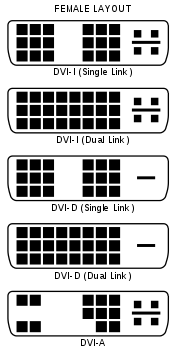](http://en.wikipedia.org/wiki/File:DVI_Connector_Types.svg)[](http://en.wikipedia.org/wiki/File:DVI_Connector_Types.svg)
Male DVI connector pins (view of plug)
[](http://en.wikipedia.org/wiki/File:M1-DA.svg)[](http://en.wikipedia.org/wiki/File:M1-DA.svg)
Male M1-DA connector pins (view of plug)
[](http://en.wikipedia.org/wiki/File:DVI_pinout.svg)[](http://en.wikipedia.org/wiki/File:DVI_pinout.svg)
Color coded female DVI connector with pin descriptions (Click image to see descriptions)
See also: [Mini-DVI](http://en.wikipedia.org/wiki/Mini-DVI) and [Micro-DVI](http://en.wikipedia.org/wiki/Micro-DVI)
The DVI connector usually contains pins to pass the DVI-native digital video signals. In the case of dual-link systems, additional pins are provided for the second set of data signals.
Dual-link should not be confused with _dual display_ (also called _dual head_), which describes those situations where a computer is hooked up to two monitors at once. Neither, either, or both of the dual displays could be dual-link. Depending on the video card(s), the displays could be both analog (VGA), an analog and a digital, or both digital.
As well as digital signals, the DVI connector includes pins providing the same analog signals found on a VGA connector, allowing a VGA monitor to be connected with a simple plug adapter (or with a special purpose DVI-A or DVI-I to VGA cable). This feature was included in order to make DVI universal, as it allows either type of monitor (analog or digital) to be operated from the same connector.
The DVI connector on a device is therefore given one of four names, depending on which signals it implements:
- _DVI-D_ (digital only)
- _DVI-A_ (analog only)
- _DVI-I_ (integrated - digital and analog)
- _M1-DA_ (integrated - digital and analog, and USB)
The connector also includes provision for a second data link for high resolution displays, though many devices do not implement this. In those that do, the connector is sometimes referred to as _DVI-DL_ (dual link).
The long flat pin on a DVI-I connector is wider than the same pin on a DVI-D connector, so it is not possible to connect a male DVI-I to a female DVI-D by removing the 4 analog pins. It is possible, however, to connect a male DVI-D cable to a female DVI-I connector. Many flat panel LCD monitors have only the DVI-D connection so that a DVI-D male to DVI-D male cable will suffice when connecting the monitor to a computer’s DVI-I female connector.
DVI is the only widespread video standard that includes analog and digital transmission options in the same connector.[[4]](http://en.wikipedia.org/wiki/Digital_Visual_Interface#cite_note-3) Competing standards are exclusively digital: these include a system using low-voltage differential signaling ([LVDS](http://en.wikipedia.org/wiki/Low_voltage_differential_signaling)), known by its proprietary names [FPD-Link](http://en.wikipedia.org/wiki/FPD-Link) (flat-panel display) and FLATLINK; and its successors, the [LVDS Display Interface](http://en.wikipedia.org/w/index.php?title=LVDS_Display_Interface&action=edit&redlink=1) (LDI) and [OpenLDI](http://en.wikipedia.org/wiki/OpenLDI).
**Some new [DVD players](http://en.wikipedia.org/wiki/DVD_player), TV sets (including [HDTV](http://en.wikipedia.org/wiki/High-definition_television) sets) and [video projectors](http://en.wikipedia.org/wiki/Video_projector)[HDCP](http://en.wikipedia.org/wiki/HDCP) connectors; these are physically the same as DVI connectors but transmit an encrypted signal using the HDCP protocol for copy protection. Computers with DVI video connectors can use many DVI-equipped HDTV sets as a display; however, due to [Digital Rights Management](http://en.wikipedia.org/wiki/Digital_Rights_Management), it is not clear whether such systems will eventually be able to play protected content, as the link is not encrypted.** have DVI/
[USB](http://en.wikipedia.org/wiki/Universal_Serial_Bus) signals are not incorporated into the connector, but were earlier incorporated into the [VESA Plug and Display](http://en.wikipedia.org/wiki/VESA_Plug_and_Display) connector used by [InFocus](http://en.wikipedia.org/wiki/InFocus) on their projector systems, and in the [Apple Display Connector](http://en.wikipedia.org/wiki/Apple_Display_Connector), which was used by [Apple](http://en.wikipedia.org/wiki/Apple_Inc.) until 2005.
The [DMS-59](http://en.wikipedia.org/wiki/DMS-59) connector is a way to combine two analog and two digital signals in one plug. It is commonly used when a single graphics card has two outputs.
[M1-DA](http://en.wikipedia.org/wiki/M1-DA) connectors are sometimes labeled as DVI-M1; they are used for the [VESA Enhanced Video Connector](http://en.wikipedia.org/wiki/VESA_Enhanced_Video_Connector) and [VESA Plug and Display](http://en.wikipedia.org/wiki/VESA_Plug_and_Display) schemes.
**Specifications**
**[[edit](http://en.wikipedia.org/w/index.php?title=Digital_Visual_Interface&action=edit§ion=6)] Digital**
- Minimum clock frequency: 25.175 MHz
- Maximum clock by cable quality (up to 330 MHz, 7.92 Gbit/s)
- Pixels per clock cycle: 1 (_single link_) or 2 (_dual_ link)
- Bits per pixel: 24 (_single_ and _dual_ link) or 48 (_dual_ link only)
- Example display modes (_single link_):
[LIST]
- [HDTV](http://en.wikipedia.org/wiki/HDTV) (1,920 × 1,080) @ 60 Hz with CVT-RB blanking (139 MHz)
- [UXGA](http://en.wikipedia.org/wiki/UXGA) (1,600 × 1,200) @ 60 Hz with GTF blanking (161 MHz)
- [WUXGA](http://en.wikipedia.org/wiki/WUXGA) (1,920 × 1,200) @ 60 Hz with CVT-RB blanking (154 MHz)
- [SXGA](http://en.wikipedia.org/wiki/SXGA) (1,280 × 1,024) @ 85 Hz with GTF blanking (159 MHz)
- [WXGA+](http://en.wikipedia.org/wiki/WXGA%2B) (1440 × 900) @ 60 Hz (107 MHz)
- [WQUXGA](http://en.wikipedia.org/wiki/WQUXGA) (3,840 × 2,400) @ 17 Hz (164 MHz)
[/LIST]
- Example display modes (_dual link_):
[LIST]
- [QXGA](http://en.wikipedia.org/wiki/QXGA) (2,048 × 1,536) @ 75 Hz with GTF blanking (2 × 170 MHz)
- [HDTV](http://en.wikipedia.org/wiki/HDTV) (1,920 × 1,080) @ 85 Hz with GTF blanking (2 × 126 MHz)
- [WUXGA](http://en.wikipedia.org/wiki/WUXGA) (1,920 × 1,200) @ 120 Hz with GTF (2 x 154 MHz)
- [WQXGA](http://en.wikipedia.org/wiki/WQXGA) (2,560 × 1,600) @ 60 Hz with GTF blanking (2 × 174 MHz) (30-inch (762 mm) Apple, Dell, Gateway, HP, NEC, Quinux, and Samsung LCDs)
- [WQXGA](http://en.wikipedia.org/wiki/WQXGA) (2,560 × 1,600) @ 60 Hz with CVT-RB blanking (2 × 135 MHz) (30-inch (762 mm) Apple, Dell, Gateway, HP, NEC, Quinux, and Samsung LCDs)
- [WQUXGA](http://en.wikipedia.org/wiki/WQUXGA) (3,840 × 2,400) @ 33 Hz with GTF blanking (2 × 159 MHz)
[/LIST]
GTF ([Generalized Timing Formula](http://en.wikipedia.org/wiki/Generalized_Timing_Formula)) is a [VESA](http://en.wikipedia.org/wiki/VESA) standard which can easily be calculated with the [Linux](http://en.wikipedia.org/wiki/Linux) gtf utility.
CVT-RB ([Coordinated Video Timings](http://en.wikipedia.org/wiki/Coordinated_Video_Timings)-Reduced Blanking) is a [VESA](http://en.wikipedia.org/wiki/VESA) standard which offers reduced horizontal and vertical blanking for non-CRT based displays.[[5]](http://en.wikipedia.org/wiki/Digital_Visual_Interface#cite_note-4)
**Clock and data relationship**
The DVI data channel operates at a bit-rate multiple of 10 times the frequency of the clock signal. In other words, for every DVI clock there are 10 bits provided on each of the three data channels. The data is encoded using a standard [8b/10b encoding](http://en.wikipedia.org/wiki/8b/10b_encoding) to provide a minimum transition density in which there are no more than five consecutive bits of the same value, which is necessary to provide reference edges for [clock/data recovery](http://en.wikipedia.org/wiki/Clock_recovery) circuits. As indicated in version 1.0 of the specification, the clock rate is the same as the pixel rate plus framing overhead, while there are usually 24 bits per pixel.
Since the data is switching at 10 times the clock rate, a receiver must recover the faster bit clock from the data lines itself (using a [PLL](http://en.wikipedia.org/wiki/Phase-locked_loop) or [DLL](http://en.wikipedia.org/wiki/Delay-locked_loop), for instance) in a process known as [clock/data recovery](http://en.wikipedia.org/wiki/Clock_recovery). The DVI clock is effectively a 1⁄10th frequency reference clock that is useful for the clock/data recovery circuitry to synchronize to the bitstream. DVI provides a reference clock while other serial data interfaces such as [PCI Express](http://en.wikipedia.org/wiki/PCI_Express) and [SATA](http://en.wikipedia.org/wiki/Serial_ATA) do not because the bit rate carried by the DVI interface may vary across a wide frequency range depending on the video format being rendered. Serial interfaces that do not explicitly carry the reference clock are typically defined to run at a specific known frequency or several derivative frequencies that are related by whole number multiples (for example 2.5 Gbit/s and 5.0 Gbit/s for successive generations of PCI Express and 1.5 Gbit/s and 3.0 Gbit/s for successive generations of SATA), so in these cases a fixed frequency reference clock can be generated locally at the receiver that performs the clock/data recovery.
**Display Power Management**
The DVI specification includes signaling for reducing power consumption. Similar to the analog [VESA display power management signaling](http://en.wikipedia.org/wiki/VESA_Display_Power_Management_Signaling) (DPMS) standard, a connected device can turn a monitor off when the connected device is powered down, or programmatically if the display controller (“graphics card”) of the device supports it. Devices with this capability can also attain Energy Star certification.
**Analog**
- RGB bandwidth: 400 MHz at −3 dB
---
### Author:  [@Shady](https://forums.speedlife.net/u/Shady)
#### Post date: [October 5, 2010, 12:01pm UTC](https://forums.speedlife.net/t/fit-pc/254880/19 "2010-10-05T12:01:13Z")
^^ more or less what I was saying when I said its not compliant with the content…
For ahwile that was a huge scare… OMG everything had to be compatible with the HDCP, video card/monitor etc… then it just kind of dissapeared…
Blu-Rays etc have this type of DRM which may be why the content did not play, as the tv etc may not have been compliant with HDCP