# Photoshop question...
**URL:** https://forums.speedlife.net/t/photoshop-question/7782
**Category:** NYSpeed Off Topic
**Created:** [February 5, 2006, 12:30pm UTC](https://forums.speedlife.net/t/photoshop-question/7782 "2006-02-05T12:30:34Z")
**Posts on this page:** 11
**Page:** 1
### Author:  [@Willybeen](https://forums.speedlife.net/u/Willybeen)
#### Post date: [February 5, 2006, 12:30pm UTC](https://forums.speedlife.net/t/photoshop-question/7782/1 "2006-02-05T12:30:34Z")
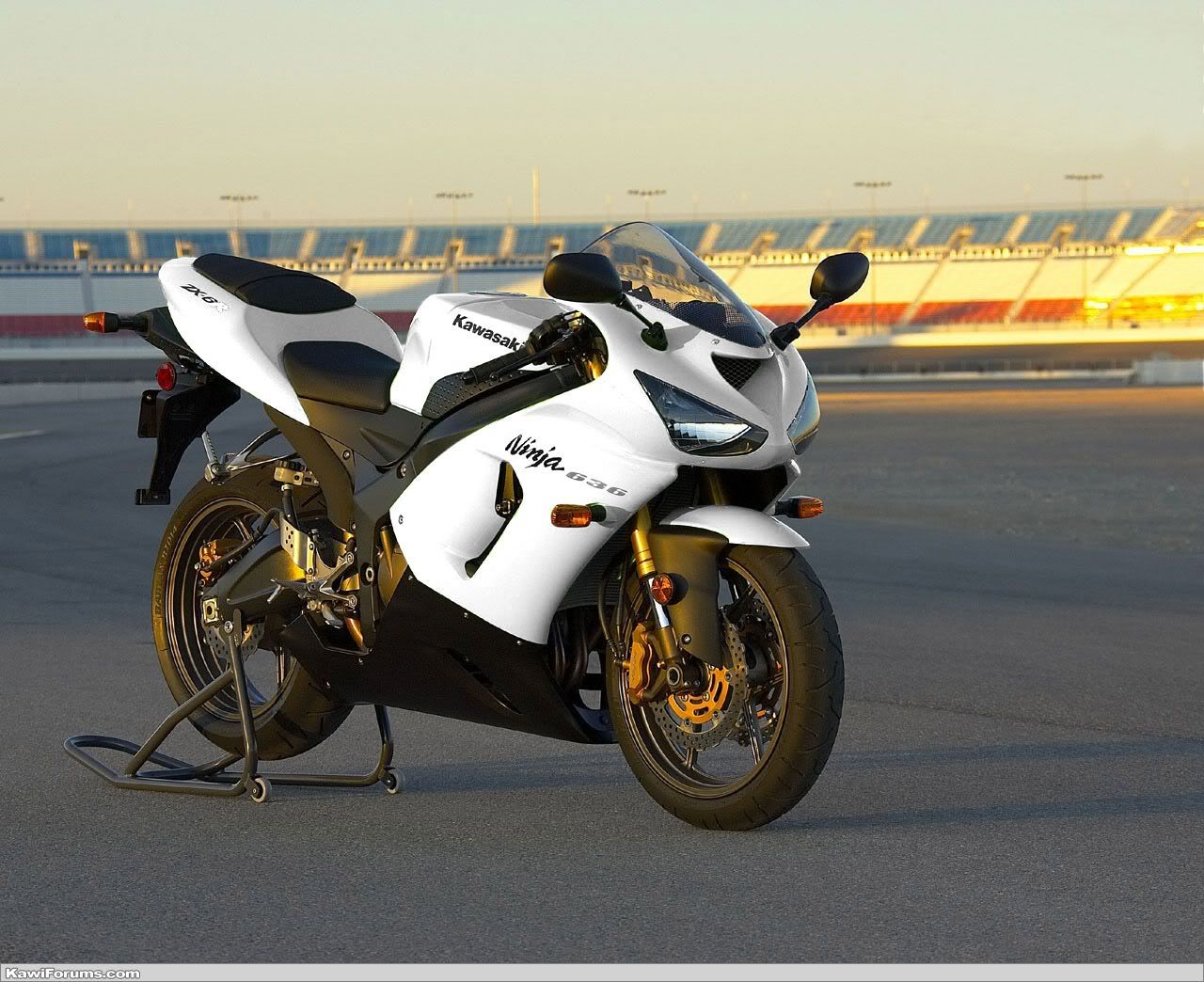
ok i want to make the lower fairing white also… my question is… how do i do it? anybody have any links to tutorials on fading and matching/changing colors???
thanks
---
### Author:  [@walter](https://forums.speedlife.net/u/walter)
#### Post date: [February 5, 2006, 12:36pm UTC](https://forums.speedlife.net/t/photoshop-question/7782/2 "2006-02-05T12:36:07Z")
going to be hard because when you start with black (or white for that matter) there is not much in the way of contrast/shading to make it look good w/ once you’ve worked on it. ill let someone else chime in.
---
### Author:  [@AlbinoMonkeyRat](https://forums.speedlife.net/u/AlbinoMonkeyRat)
#### Post date: [February 5, 2006, 12:45pm UTC](https://forums.speedlife.net/t/photoshop-question/7782/3 "2006-02-05T12:45:07Z")
use the lasso select tool to select exactly what you want to change (that will be the most difficult part because you need a really steady hand). Don’t forget you can use the [shift] key to allow you to do it in sections.
once you have your object selected, go up to
Image-\>Adjustments-\>Hue/Saturation
an options window pops up:
1. check the “Colorize” option
2. drag the Saturation slider all the way down to zero.
3. adjust the brightness slider so that it’s the shade of white that you’d like.
I hope that helps you. 🙂
---
### Author:  [@Willybeen](https://forums.speedlife.net/u/Willybeen)
#### Post date: [February 5, 2006, 12:49pm UTC](https://forums.speedlife.net/t/photoshop-question/7782/4 "2006-02-05T12:49:43Z")
thanks albino… now its time to just fuck with it for a while…
---
### Author:  [@Willybeen](https://forums.speedlife.net/u/Willybeen)
#### Post date: [February 5, 2006, 12:52pm UTC](https://forums.speedlife.net/t/photoshop-question/7782/5 "2006-02-05T12:52:51Z")
ok now theres a peice on the lower fairing that i dont want to change the color of… the little slash, is there a way to deselect that or make it stay the same… maybe fade in?
---
### Author:  [@AlbinoMonkeyRat](https://forums.speedlife.net/u/AlbinoMonkeyRat)
#### Post date: [February 5, 2006, 12:55pm UTC](https://forums.speedlife.net/t/photoshop-question/7782/6 "2006-02-05T12:55:50Z")
umm…I would suggest selecting the big piece in sections, and just make sure that part doesn’t get selected in the bigger sections.
---
### Author:  [@98SS10](https://forums.speedlife.net/u/98SS10)
#### Post date: [February 5, 2006, 1:18pm UTC](https://forums.speedlife.net/t/photoshop-question/7782/7 "2006-02-05T13:18:23Z")
i simply lassoed, then colored white using the ink drop tool to get the exact color, then colored it in and then shadowed accordingly.
[](http://photobucket.com)
also got rid of that hideous rear fender.
---
### Author:  [@Willybeen](https://forums.speedlife.net/u/Willybeen)
#### Post date: [February 5, 2006, 1:44pm UTC](https://forums.speedlife.net/t/photoshop-question/7782/8 "2006-02-05T13:44:21Z")
urs looks much better than mine did… thank you
---
### Author:  [@sureshot](https://forums.speedlife.net/u/sureshot)
#### Post date: [February 5, 2006, 1:54pm UTC](https://forums.speedlife.net/t/photoshop-question/7782/9 "2006-02-05T13:54:27Z")
just for your guys own reference you can use the extract feature to pull out the part perfectly, recolor it, and throw it back down over the original
with extract you dont need a steady hand, you dont need to do it all at once, and you can zoom in as much as you want to make sure you get each and every pixel
additionally, i think the bike looks hot as shit without the photohax. if someone is selling it, let me know =)
---
### Author:  [@Janny](https://forums.speedlife.net/u/Janny)
#### Post date: [February 5, 2006, 4:04pm UTC](https://forums.speedlife.net/t/photoshop-question/7782/10 "2006-02-05T16:04:09Z")
the image seems to be corrupted and it’s shutting down CS2… :c /
---
### Author:  [@Phoenix\_305](https://forums.speedlife.net/u/Phoenix_305)
#### Post date: [February 5, 2006, 5:14pm UTC](https://forums.speedlife.net/t/photoshop-question/7782/11 "2006-02-05T17:14:15Z")
> [@walter](#):
>
> going to be hard because when you start with black (or white for that matter) there is not much in the way of contrast/shading to make it look good w/ once you’ve worked on it. ill let someone else chime in.
You’re right…there really isnt any way to do a good job of it. the contrast levels are too extreme.