# Xp reformat
**URL:** https://forums.speedlife.net/t/xp-reformat/153582
**Category:** NYSpeed Off Topic
**Created:** [April 18, 2010, 2:29pm UTC](https://forums.speedlife.net/t/xp-reformat/153582 "2010-04-18T14:29:38Z")
**Posts on this page:** 11
**Page:** 1
### Author:  [@ultradriver10000](https://forums.speedlife.net/u/ultradriver10000)
#### Post date: [April 18, 2010, 2:29pm UTC](https://forums.speedlife.net/t/xp-reformat/153582/1 "2010-04-18T14:29:38Z")
I have an XP based comp that keeps restarting.
I’ve downloaded the Microsoft exe and burnt this onto cd.
I put this in and it still keeps restarting.
What am I doing wrong??
I need to reformat this thing…

---
### Author:  [@ryanmcell](https://forums.speedlife.net/u/ryanmcell)
#### Post date: [April 18, 2010, 5:47pm UTC](https://forums.speedlife.net/t/xp-reformat/153582/2 "2010-04-18T17:47:32Z")
Are you simply trying to format the drive, or are you trying to reinstall the OS?
---
### Author:  [@ultradriver10000](https://forums.speedlife.net/u/ultradriver10000)
#### Post date: [April 18, 2010, 6:18pm UTC](https://forums.speedlife.net/t/xp-reformat/153582/3 "2010-04-18T18:18:17Z")
> [@ryanmcell](#):
>
> Are you simply trying to format the drive, or are you trying to reinstall the OS?
reinstall xp
---
### Author:  [@ProgRocker](https://forums.speedlife.net/u/ProgRocker)
#### Post date: [April 18, 2010, 6:26pm UTC](https://forums.speedlife.net/t/xp-reformat/153582/4 "2010-04-18T18:26:14Z")
there is no autorun.inf file so there is nothing telling it to run at startup. those fileformats don’t look correct at all.
---
### Author:  [@ultradriver10000](https://forums.speedlife.net/u/ultradriver10000)
#### Post date: [April 18, 2010, 7:21pm UTC](https://forums.speedlife.net/t/xp-reformat/153582/5 "2010-04-18T19:21:43Z")
Help me out then lol, I need to make a xp cd that will allow me to do a clean reformat…
---
### Author:  [@TradersBASE](https://forums.speedlife.net/u/TradersBASE)
#### Post date: [April 18, 2010, 7:43pm UTC](https://forums.speedlife.net/t/xp-reformat/153582/6 "2010-04-18T19:43:41Z")
You have a D drive with a recovery partition on it. Backup your documents if possible and run the recovery partition.
FYI…it’s probably F11 key at startup to get it to fire recovery mode.
Added—
Probably not XP the more I think about this. Whatever your system came with is what recovery would re-install.
---
### Author:  [@ProgRocker](https://forums.speedlife.net/u/ProgRocker)
#### Post date: [April 18, 2010, 8:46pm UTC](https://forums.speedlife.net/t/xp-reformat/153582/7 "2010-04-18T20:46:14Z")
Easiest way is to grab an .ISO image and burn it with [ImgBurn](http://www.imgburn.com/). I tend to go for the untouched ones, I hate the fggty ones that are hacked up and have the icons all changed, and shit added and removed. There are plenty of “genuine activators” and most of the ISOs come with cd keys. If that recovery partition (as mentioned above) is an XP partition than just hit F11 while booting to bring up the recovery partition. It is most likely not.
---
### Author:  [@FrankHam24](https://forums.speedlife.net/u/FrankHam24)
#### Post date: [April 19, 2010, 6:45am UTC](https://forums.speedlife.net/t/xp-reformat/153582/8 "2010-04-19T06:45:45Z")
I would venture to guess that it’s probably a Vista partition that you’d be recovering to by the looks of the screenshot. Go with the XP .iso, it’s the easiest way. Or run Linux 🙂
---
### Author:  [@boardjnky4](https://forums.speedlife.net/u/boardjnky4)
#### Post date: [April 19, 2010, 6:48am UTC](https://forums.speedlife.net/t/xp-reformat/153582/9 "2010-04-19T06:48:37Z")
that doesn’t look right AT ALL
please post the exact steps you’ve taken already.
---
### Author:  [@ProgRocker](https://forums.speedlife.net/u/ProgRocker)
#### Post date: [April 19, 2010, 6:55am UTC](https://forums.speedlife.net/t/xp-reformat/153582/10 "2010-04-19T06:55:46Z")
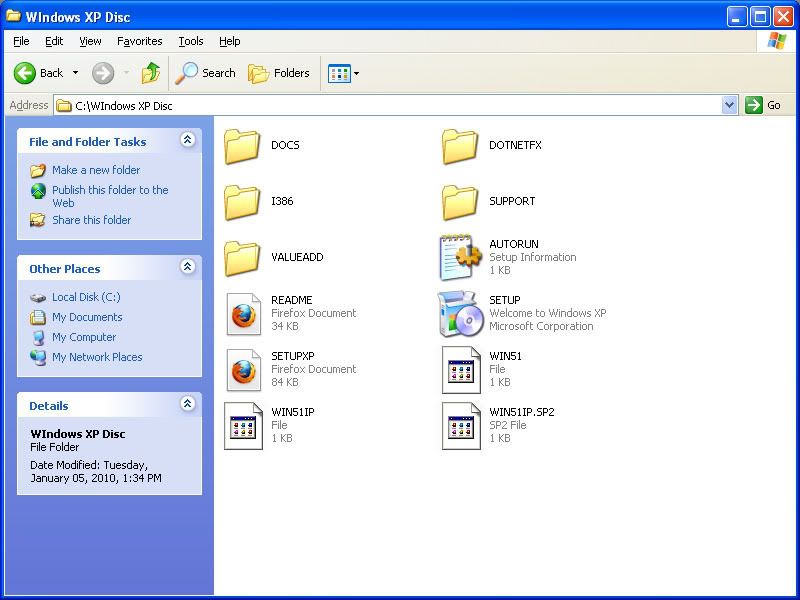
This is what and XP CD looks like, it may vary depending on version:
---
### Author:  [@ultradriver10000](https://forums.speedlife.net/u/ultradriver10000)
#### Post date: [April 23, 2010, 12:51pm UTC](https://forums.speedlife.net/t/xp-reformat/153582/11 "2010-04-23T12:51:18Z")
I failed… I ended up borrowing a Dell XP recovery CD and reformatted XP with that.
What I was trying to do was load the info from this site…
[http://www.microsoft.com/downloads/details.aspx?displaylang=en&FamilyID=E8FE6868-6E4F-471C-B455-BD5AFEE126D8](http://www.microsoft.com/downloads/details.aspx?displaylang=en&FamilyID=E8FE6868-6E4F-471C-B455-BD5AFEE126D8)
onto a CD to reformat XP… IDK I suck at computers.